CDBurnerXP Download (2026): Free CD, DVD & Blu-ray Burning Software
Short answer: CDBurnerXP is a free Windows program that burns CDs, DVDs, and Blu-ray discs, including ISO images and bootable media. The buttons below start your CDBurnerXP download right now: no registration, no payment, ready for Windows 11. Development has gone quiet, but version 4.5.8.7128 still handles every burn most people need.
CDBurnerXP — 32-bit
Compatible with all 32-bit and 64-bit editions of Windows.
CDBurnerXP — 64-bit
Optimized for 64-bit editions of Windows 7 and newer.
CDBurnerXP at a glance
| Version | 4.5.8.7128 |
|---|---|
| License | Freeware. Free for personal and commercial use. Not open source. |
| Price | $0 |
| Platforms | Windows 7–11, 32-bit and 64-bit (vendor badge; its own requirements table says XP–11) |
| Requirements | .NET Framework 4.0 or newer, plus a CD/DVD/Blu-ray writer |
| Installer size | About 5.3 MB (portals report 5.14–6.17 MB) |
| Languages | Multilanguage interface |
| Last release | 2019 or 2020; portals disagree (Nov 17, 2019 vs Dec 10, 2020) |
| Blu-ray capacity | BD-R/BD-RE: 25 GB single-layer, 50 GB dual-layer |
One more vendor disagreement: the download page says 10 MB of free disk space, the homepage says about 30 MB. Either way, small.
What is CDBurnerXP?
CDBurnerXP is a free disc-burning program for Windows. Canneverbe Limited is the developer of record, per the vendor. Portals split, naming Stefan Haglund (TechSpot, MajorGeeks) or "Stefan Haglund & Co" (Uptodown). That's the whole drama, and it's the worst thing you can say about a tool this capable. It burns data discs and audio CDs, handles Blu-ray, creates and burns ISO images, builds bootable discs, and ships with a multilanguage interface. Consider that paragraph your 30-second CDBurnerXP review.
Format coverage runs wide: CD-R/RW, DVD±R/RW with dual-layer and DVD-RAM, BD-R/RE, HD-DVD-R/RW, and M-Disc, rated by the vendor at "up to 1,000 years" of preservation. Audio sources include MP3, WAV, FLAC, OGG, WMA, and more; disc images include ISO, BIN, NRG, and MDF. Download counts back it up: 1.49 million on MajorGeeks, 535,000 on Uptodown. Free for personal and commercial use, which is rarer than it sounds.
Key features at a glance
Per the vendor and TechSpot's feature list:
- Buffer-underrun protection, so a slow source doesn't ruin a burn.
- Multi-session discs, plus disc spanning across multiple discs.
- Create, burn, and convert ISO images (BIN and NRG convert to ISO).
- CD-Text and gapless disc-at-once audio burning.
- Cover printing built into the app.
- A command-line version for scripted jobs.
- An integrated audio player and an audio ripper with MP3 conversion.
- Bootable discs for BIOS boot, Windows recovery, or Linux live media.
CDBurnerXP download: get it here (safely)
Download from this page
Your CDBurnerXP download starts at the buttons up top. One click, no email, no account. Both hand off to the same download links the official site's own buttons use, straight from cdburnerxp.com. Prefer to pick through every variant yourself? CDBurnerXP's download page offers every build below. The CDBurnerXP free download costs nothing either way.
Which build should you pick?
Every CDBurnerXP download variant is free; pick by shape:
- Standard Installer. The usual setup file, all languages included.
- Adware-Free Installer. Same app, "clean install, no bundles" per the vendor.
- Portable. A zip for USB sticks and machines you can't install on.
- MSI Package. For IT admins deploying through group policy.
Both builds wait in the download box up top. Take 64-bit on anything modern; the CDBurnerXP download for 32-bit systems belongs on XP-era hardware.
CDBurnerXP download not working? Try these checks first:
- Check 32-bit versus 64-bit against your version of Windows.
- Confirm .NET Framework 4.0 or newer; Windows 8 and later ship with it.
- Pause ad blockers that choke on the vendor's two-step download pages, then retry.
- Fall back to the download box at the top of this page.
Two mirror cautions from what we observed. The MSI button on cdburnerxp.com hands off to a third-party CDN (dappcdn.com), and the CDBurnerXP SourceForge project is user-maintained, last updated October 2023. Neither is a scam signal. The canonical source is still cdburnerxp.com, and the buttons up top hand off to the links it serves.
Which site is the official CDBurnerXP website?
Here's the story no ranking page tells. For years, cdburnerxp.se was the official domain. It's dead now. A r/techsupport thread says it straight: "the former site, https://cdburnerxp.se/, no longer works." A r/CDs thread titled "Is cdburnerxp.com safe? Can't access cdburnerxp.se" asks the follow-up nobody answers. Old bookmarks and tutorials still point there. That's why your favorite 2012 guide 404s.
Today, CDBurnerXP's official site is cdburnerxp.com: it ranks at the top of the results, carries the current 4.5.8.7128 build, and shows a German imprint (Ralph Berzovsky, Hanau) under a © 2025 notice. The dead domain even lingers on page one: MajorGeeks' version-history link still points at cdburnerxp.se, sending a major portal's own visitors to a dead page. A working CDBurnerXP download comes from the .com domain, not the dead .se.
And every CDBurnerXP download copy elsewhere? Portals (Softonic, TechSpot, Uptodown, CNET) host their own files, SourceForge hosts the user mirror, and the "cdburnerxp download reddit" threads keep asking which to trust. Our answer: cdburnerxp.com, and the download box at the top of this page hands off to the same CDBurnerXP download links.
Is CDBurnerXP safe to download?
Yes, when you control the source. The vendor claims "No Adware, No Spyware" and no hidden fees. Page one muddies that: MajorGeeks tags the installer "Ad-Supported" while tagging the portable build "Freeware," and the vendor sells the distinction with an "Adware-Free Installer" variant. That's the classic free-software pattern: the standard setup may carry offers, and a cleaner build sits one click away.
A real r/techsupport thread asks "Does CDburnerXP come with adware?" Here's the evidence-based answer: current packages state no adware, and the genuine risk in a CDBurnerXP download isn't the app. It's repackagers swapping in bundle installers of their own.
On verification: Uptodown publishes a SHA256 checksum (04b7de2b…fe77a) for its copy, which is the right habit. cdburnerxp.com publishes none. Until that changes, the safest CDBurnerXP download is the vendor's own download flow. Like the buttons above.
CDBurnerXP on Windows 11 (and older Windows)
Official support covers Windows 11, 10, 8, and 7, in 32-bit and 64-bit, and cdburnerxp.com runs a dedicated Windows 11 compatibility page. One honest wrinkle: the vendor's download badge says Windows 7–11 while its homepage requirements table says XP through 11. Treat 7–11 as the promise and XP as a bonus.
Looking for CDBurnerXP for Windows 11 in particular? You're covered, and so is everyone else: the CDBurnerXP download for Windows 11 and the CDBurnerXP download for Windows 10 are the same file. Requirements stay light. .NET Framework 4.0 or newer comes preinstalled on Windows 8 and later. Disk space: 10 MB or 30 MB, depending which vendor page you read. And you'll need an actual CD, DVD, or Blu-ray writer.
CDBurnerXP portable vs installer
Can't install software, or won't? That's the portable build's whole reason to exist. Both routes to a CDBurnerXP download are free; the difference is friction. Here's how the two options split:
| Installer | Portable | |
|---|---|---|
| Installation | Normal Windows setup | None. Unzip and run |
| Admin rights | The usual install prompt | Not needed. Nothing is installed |
| USB stick use | Awkward | The point. Carry it between PCs |
| ISO shell integration | Registers ISO file associations | None. Nothing registers |
| Best for | Your main PC | Locked-down machines, USB toolkits, test runs |
The portable zips are genuine release files: CDBurnerXP-4.5.8.7128.zip for 32-bit and CDBurnerXP-x64-4.5.8.7128.zip for 64-bit, about 6.10 MB per MajorGeeks. So the CDBurnerXP portable 64-bit download is the x64 zip, and no, it never asks to install.
Is CDBurnerXP still supported?
Sort of. The CDBurnerXP download labeled latest is version 4.5.8.7128, dated November 17, 2019 by MajorGeeks and December 10, 2020 by Uptodown. Portals disagree, and cdburnerxp.com publishes no date at all. CNET's editors list "Limited updates and development" among the cons, which matches a version frozen since about 2020.
Quiet isn't dead, though. The site is alive with a © 2025 imprint, the downloads work, and nothing about burning a disc has changed. Verdict: stable enough to trust with your discs in 2026, just not a project that ships every month.
How to burn an audio CD with CDBurnerXP
After your CDBurnerXP download finishes, the classic first job is an audio CD. Six steps:
- Open the app and start a new compilation. Choose the Audio CD type.
- Add tracks. MP3, WAV, FLAC, OGG, and WMA files all work as sources. Need order ideas? Our guide to putting together a mix CD has plenty.
- Arrange the tracks into your final play order.
- Insert a blank CD-R in your writer.
- Choose burn options. Disc-at-once gives gapless transitions between tracks.
- Hit Burn and let it finish. Don't eject while it writes.
Two extras worth knowing: CDBurnerXP writes CD-Text, so track names appear on players that support it, and an integrated audio player previews your picks before they hit plastic.
How to burn an ISO with CDBurnerXP
Once the CDBurnerXP download above is installed, disc images are the other classic job. One rule matters before you start: a bootable Linux or Windows image has to go through the app's ISO mode, not a plain data disc, or the boot record gets stripped.
- Launch the app and pick "Burn ISO image" from the startup dialog. On older builds, create a data disc instead and choose File → Burn disc from ISO File.
- Click the "…" button and select your ISO file.
- Choose the target drive and pick a moderate speed. The official guide suggests 4x–8x for bootable images.
- Leave "Finalize disc" checked so the disc closes after the burn.
- Click "Burn disc" and let it run. Expect 5–20 minutes depending on image size and drive speed.
- The disc ejects automatically when it finishes. Tick "Verify written data" first if the disc has to be right (a Windows installer, say).
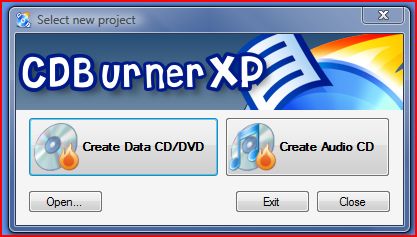
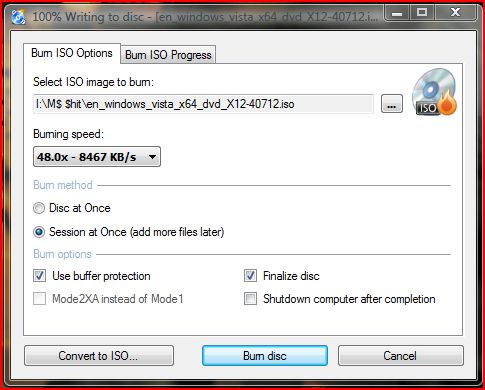
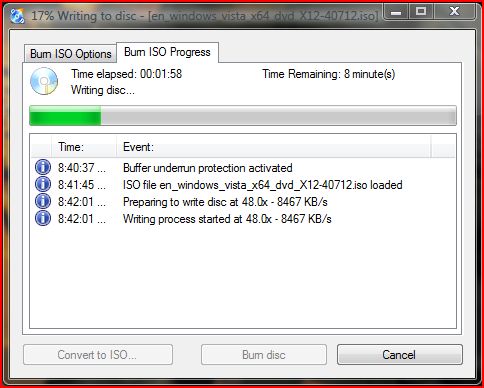
Rather watch it done? Britec09, a long-running UK PC-repair channel, walks the same flow, from the CDBurnerXP download to a finished bootable disc, in under five minutes:
'XP burn', 'CD XP burner' and other names people search for
People look for this program under a pile of nicknames: "XP burn," "CD XP burner," "cdxp burner." All roads lead to CDBurnerXP. The name goes back to the Windows XP era, and the vendor's requirements table still lists XP. The software outgrew the name: one CDBurnerXP download covers everything from the XP listings to Windows 11.
Free alternatives to CDBurnerXP
It's not the only free game in town:
- ImgBurn ( imgburn.com ). The expert's pick for ISO-heavy work. Version 2.5.8.0 has been quiet since 2013; MajorGeeks calls its installer "clean installer without OpenCandy."
- BurnAware Free ( burnaware.com ). A polished free tier from the portals' similar lists.
- AnyBurn ( anyburn.com ). Small, free, another similar-list regular.
Missing an optical drive? Then no CDBurnerXP download helps, and neither do the alternatives. You can still make a virtual CD in your browser: pick real tracks, burn a fake disc, send it as a link.
How to download CDBurnerXP?
Three steps. Click a Download button at the top of this page; both point at the official cdburnerxp.com download flow. Run the installer it saves. Pick your language on first launch and burn something. Prefer going direct? The same CDBurnerXP download sits on the vendor's site, no registration either way.
Is CDBurnerXP safe to download?
Yes, when the source is right: a safe CDBurnerXP download means the vendor's package or this page's copy of it. The vendor states "No Adware, No Spyware." The real hazard is aggregator sites that repackage installers with bundles of their own. See the safety section above for the MajorGeeks "Ad-Supported" tag and the checksum story.
Is CDBurnerXP still supported?
Yes, in the quiet way. The latest release is 4.5.8.7128; portals date it 2019 or 2020. Development crawls; CNET's cons list says "Limited updates and development." But the site carries a © 2025 imprint, the build you get today is the same one, and it runs on Windows 11.
Is CDBurnerXP really free?
Yes. $0 for personal use, $0 for commercial use. The vendor says it flat out: no subscription, no hidden fees. One nuance: free isn't open source here. Uptodown files the license as Proprietary and SourceForge as "Other License."
How do I install CDBurnerXP?
Run the installer and pick standard or custom setup; both options exist on the vendor's Windows download page. Windows 8 and newer already include the required .NET Framework 4.0. Removal happens through Programs and Features, same as any Windows program.
Is CDBurnerXP a virus or malware?
No. The app itself is clean: the vendor states no adware and no spyware, and Softonic's safety scan returns "Score result: Clean." CDBurnerXP malware reports trace to repackaged copies on shady download sites, not the official build. Get your CDBurnerXP download from the vendor or this page and the question answers itself.
Does CDBurnerXP work on Windows 11?
Yes. The vendor lists Windows 11 alongside 10, 8, and 7, in 32-bit and 64-bit, and maintains a Windows 11 compatibility page. The required .NET Framework 4.0 ships with Windows 8 and later. The CDBurnerXP download for Windows 11 is just the standard installer.
Does CDBurnerXP rip CDs?
Yes. Uptodown's review notes the app "includes an audio ripper and mp3 converter," so you can pull tracks off a disc and convert them to MP3. Burning stays the main event, but ripping is in the box.
Can CDBurnerXP burn ISO files?
Yes, and then some. It burns existing ISO images, creates ISO images from files or discs, and converts older BIN and NRG images to ISO. Bootable ISOs are covered too, per the vendor and TechSpot's feature list.
Does CDBurnerXP support Blu-ray burning?
Yes. BD-R and BD-RE media both work, in single-layer 25 GB and dual-layer 50 GB sizes, per the vendor. You'll need a Blu-ray writer; a plain CD/DVD drive won't cut it. That rounds out data, audio, ISO, and Blu-ray in one free package.
Is there a portable version of CDBurnerXP?
Yes. The portable CDBurnerXP download is a zip in 32-bit and 64-bit flavors: CDBurnerXP-4.5.8.7128.zip and the x64 variant. No install, no registration, runs straight from a USB stick. The portable vs installer table above lays out the trade-offs.
Is CDBurnerXP available for Mac?
No. CDBurnerXP is Windows-only, whatever Softonic's "Looking for mac version?" prompt implies. On a Mac, use the free Burn app or Finder's built-in burning. Or skip installs and see how burning a CD online works instead.
No CD drive at all?
That's the boat most laptops are in. No drive means no desktop burner applies, CDBurnerXP included. But you can keep the ritual: make a virtual mix CD in your browser, no hardware and no install. Want the full map first? Our guide to burning CDs without an optical drive covers every route, real and virtual.